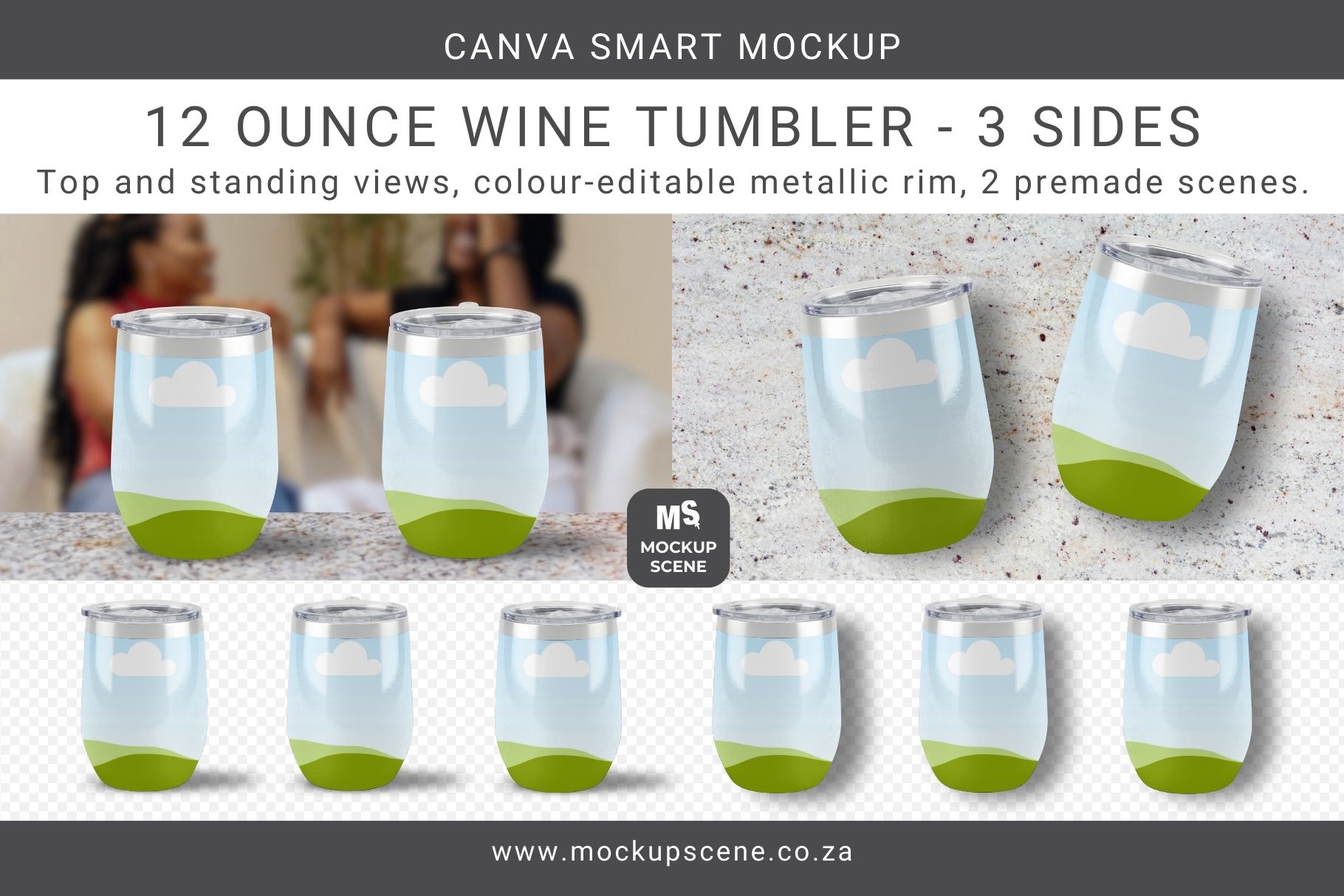
This 12oz Wine Tumbler Canva Mockup set includes 3 separate tumbler mockup objects that show the left, centre, and right side in both standing and top views. The metallic rim of the tumbler can be colour edited separately. In addition, there are two ready-to-use pre-made mockup scenes. Easy to use, drag and drop, customize background. Full instructions are included for beginners. Create realistic mockups to display your unique patterns or designs on a realistic 12oz wine tumbler without the need for a single photoshoot! Each of the six tumbler objects included has a single Canva container frame to drop your design into. The shine overlay and drop shadow are both editable. Click on the metallic rim to change the colour from the toolbar. The tumbler is moveable which means you can duplicate it to have two next to each other, or stack two on top of each other. Easily change the background scene to match the theme of your design. Think about your design theme and add a background that works with it to get a fully customized end mockup. The two ready-to-use pre-made mock-up scenes are included for you to get started with right away. They feature removeable backgrounds that you can use as-is or swap out for your own. The shelf included in the standing view mockup scene is separate from the background. This gives you the option to leave it in place and just swap out the background image if preferred. You might also like my Skinny Tumbler Canva Mockup set. Will work well for the following design niches: Sublimation Crafters: Perfect for demonstrating how a full-wrap design will look once printed and applied. POD (Print-on-Demand) Sellers: Use these instead of generic supplier photos in order to create a high-end, boutique brand aesthetic. Graphic Designers: Showcase your tumbler wrap “digital paper” bundles in a way that helps customers visualize the final product. Small Business Owners: Create personalized gift mockups for weddings, bridesmaids, or corporate branding without wasting physical stock. Why choose my 12oz Wine Tumbler Canva Mockup? Compared to Canva’s in-house mockups and PNG overlay mock-ups, these customizable smart mockups allow you to duplicate and layer objects to showcase multiple designs effectively. All objects are moveable and drop shadows are editable. Any underlying shadows or textures will show through your design. Add a unique background color or scene, and cut-out props to make your mockups truly unique and stand out. There are a lot of other tumbler mockups available for Canva and I’ve studied them all. Few of them have the same quality and versatility as mine do and many of them are copies from PLR bundles. You need mockups that are properly built, easy to use, and easy to customise, in order for your product images to look professional and stand out. Main features include: Versatile Customization: Easily personalize the mockup by photographing your workspace or using a studio background texture. Insert your JPG or PNG patterns or designs directly into the container frames to create a unique and professional product display. High-Quality Build: This mockup is custom-built for quality and style consistency. With effortless drag-and-drop functionality, you can achieve a realistic and polished end-product without needing Photoshop. Comprehensive Guidance: Detailed page notes included in the mockup guide you through the entire customization process, ensuring even Canva beginners can create stunning designs. Usage Terms: This mockup bundle is for displaying your personal or commercial designs. Reselling the mockups in any format is prohibited. Copying any part of these mockups into new Canva templates for sale is not allowed. Please review my License Document before purchasing and using this product. How to Use this 12oz Wine Tumbler Set for Canva: Download & Access. Start by downloading the User PDF and navigate to page 4 for license details and the Canva template link. Do not try to import the PDF into Canva as it doesn’t contain the mockups. Upload Your Designs. Ensure designs or patterns are uploaded to Canva in JPG or PNG format at the correct size ratio. Customize. – Import or copy the mockup into a new Canva design and drag your design into the custom-created container frames. – Adjust size, transparency, and shadows as needed to achieve the desired look. Add Backgrounds. Finally, customize the mockup further by adding your own background color, texture, scene, or digital props. Read Notes. Read the notes section for each mockup in the template for help on usage and additional tips. Included Mockups Wine tumbler standing view, 3 sides (left, front, right) Wine tumbler top (flat lay) view, 3 sides (left, front, right) Pre-made mockup scene with 2 tumblers on a counter top. Pre-made mockup scene with 2 top-view tumblers on a counter top. Mockup Summary: Format: PDF with Canva access link. Template Dimensions: 3000 x 2000 px Resolution: 300dpi, perfect for print. Object Details: Transparent PNGs with separate, editable shadows. Customization: Drag and drop designs or change surface colors. Moveable Objects: Duplicate and rearrange as needed. Professional Display: Ideal for showcasing pattern designs. Requirements: Canva free or Pro. Stay updated on new products and creative mockup usage by following Mockup Scene on Instagram.