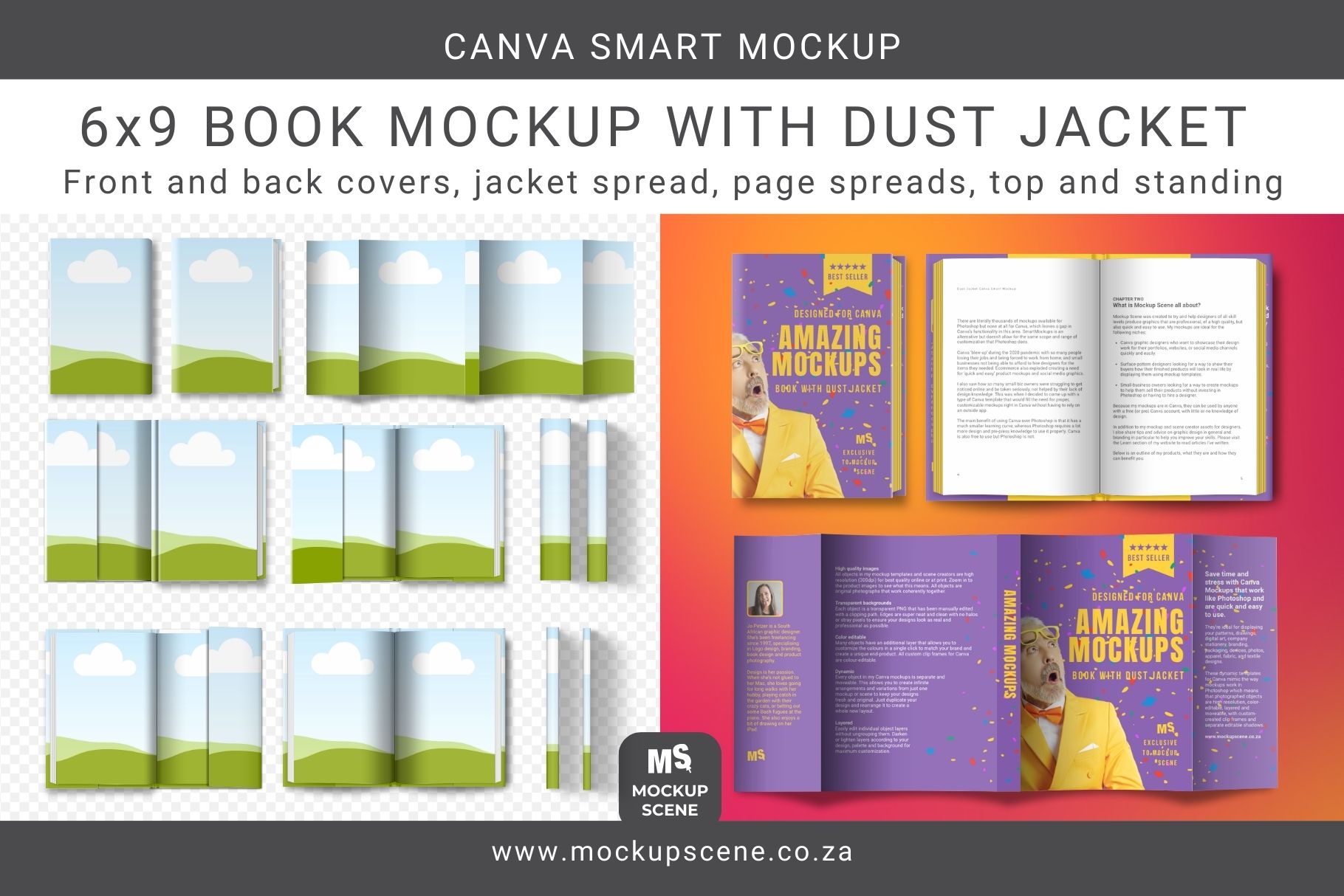
This Book with Dust Jacket Canva Mockup set includes front and back covers, full jacket spread, front and back end pages, two-page spread, and spines. All mockups are in top view (flat lay) and standing view. Full instructions are included for beginners. BONUS: A free book design checklist for print and digital success is included with this set to help you make sure you have everything in order for your book before launching it. Use this Book Mockup with Dust Jacket Canva Smart Mockup to create realistic layouts to display your cook cover, dust jacket, spine and page spreads for presentation in your shop, portfolio, or social channels. It features 7 separate mockup objects, plus 4 different widths for the isolated spine displays. It is ideal for a 6×9 book, or any book that is a 3:2 aspect ratio. Each individual mockup object is isolated and moveable with separate overlay shadows and shines, and a separate editable drop shadow. You might also like one of my other Canva book mockups: 6×9 Hard Cover Book and Page Mockups 6×9 Soft Cover Book and Page Mockups KDP Book Mockups (6×9, 5×8, 6×8, 8×10, 7×10, square) The book mockups in this set are built from original digital vector drawings. They are high quality at 300dpi actual size. No AI objects are used. Unlike Canva’s in-house mockups and PNG overlay mock-ups, these customizable smart mockups allow you to duplicate and layer objects to showcase multiple designs effectively. All objects are moveable and drop shadows are editable. Any underlying shadows or textures will show through your design. Add a unique background color or scene, and cut-out props to make your mockups truly unique and stand out. Will work well for the following book presentations Professional Marketing & Presentations Book Cover Reveals: Authors can use the front cover and standing views to create “Coming Soon” teasers that look like a professional photoshoot. Full Jacket Visualization: The jacket spread mockup allows designers to show off the entire design—including the spine and flaps—which is crucial for physical book sales. Standing & Top Views: These are perfect for creating realistic “book stacks” or lifestyle images for an author’s website or media kit. 2. Visualizing the Reader Experience Page Spread Mockups: Authors can give readers a “peek inside” by displaying their typesetting or interior illustrations on the page spread views. Back Cover Sales: Often overlooked, the back cover mockup allows authors to display their blurb and author photo in a realistic context. 3. Pre-Launch & Hype Building Social Media Content: These images are perfect for Bookstagram, BookTok, or Pinterest, where aesthetic, high-quality visuals are the currency of engagement. Amazon A Content: Authors can use these mockups to create the “From the Publisher” section on Amazon, which significantly increases conversion rates by showing the book’s physical quality. Why choose my Book with Dust Jacket Canva Mockup? There are a lot of other book mockups available for Canva and I’ve studied them all. None of them have the same quality and versatility as mine do. Many of them are copies from PLR bundles. If you want your mockups to look professional and stand out, you need mockups that are unique, properly built, easy to use, and easy to customise. Main features include: Versatile Customization: Easily personalize the mockup by photographing your workspace or using a studio background texture. Insert your JPG or PNG patterns or designs directly into the container frames to create a unique and professional product display. High-Quality Build: This mockup is custom-built for quality and style consistency. With effortless drag-and-drop functionality, you can achieve a realistic and polished end-product without needing Photoshop. Comprehensive Guidance: Detailed page notes included in the mockup guide you through the entire customization process, ensuring even Canva beginners can create stunning designs. Ideal for: Self-Published Authors: Those who need professional-grade imagery on a budget. Book Cover Designers: To present their final designs to clients in a realistic, three-dimensional way. Indie Publishers: To create cohesive marketing materials for their entire catalog. Usage Terms: This mockup bundle is for displaying your personal or commercial designs. Reselling the mockups in any format is prohibited. Copying any part of these mockups into new Canva templates for sale is not allowed. Please review my License Document before purchasing and using this product. How to Use this Book Mockup Kit for Canva: Download & Access. Start by downloading the User PDF and navigate to page 4 for license details and the Canva template link. Do not try to import the PDF into Canva as it doesn’t contain the mockups. Upload Your Designs. Ensure your designs or patterns are uploaded to Canva in JPG or PNG format at the correct size ratio. Customize. – Import or copy the mockup into a new Canva design and drag your design into the custom-created container frames. – Adjust size, transparency, and shadows as needed to achieve the desired look. Add Backgrounds. Customize the mockup further by adding your own background color, texture, scene, or digital props. Read Notes. Read the notes section for each mockup in the template for help on usage and additional tips. Included Mockups Top view (flat lay) and standing mockups: Front and back covers isolated Full 5-panel dust jacket spread Front hard cover with open dust jacket, showing inner flap. Front end page with front jacket flap Back end page with back jacket flap Two-page spread over jacket flaps 4 different widths vertical spines 4 different widths horizontal spines Mockup Summary: Format: PDF with Canva access link. Template Dimensions: 3000 x 2000 px Resolution: 300dpi, perfect for print. Object Details: Transparent PNGs with separate, editable shadows. Customization: Drag and drop designs or change surface colors. Moveable Objects: Duplicate and rearrange as needed. Professional Display: Ideal for showcasing pattern designs. Requirements: Canva free or Pro. Stay updated on new products and creative mockup usage by following Mockup Scene on Instagram.