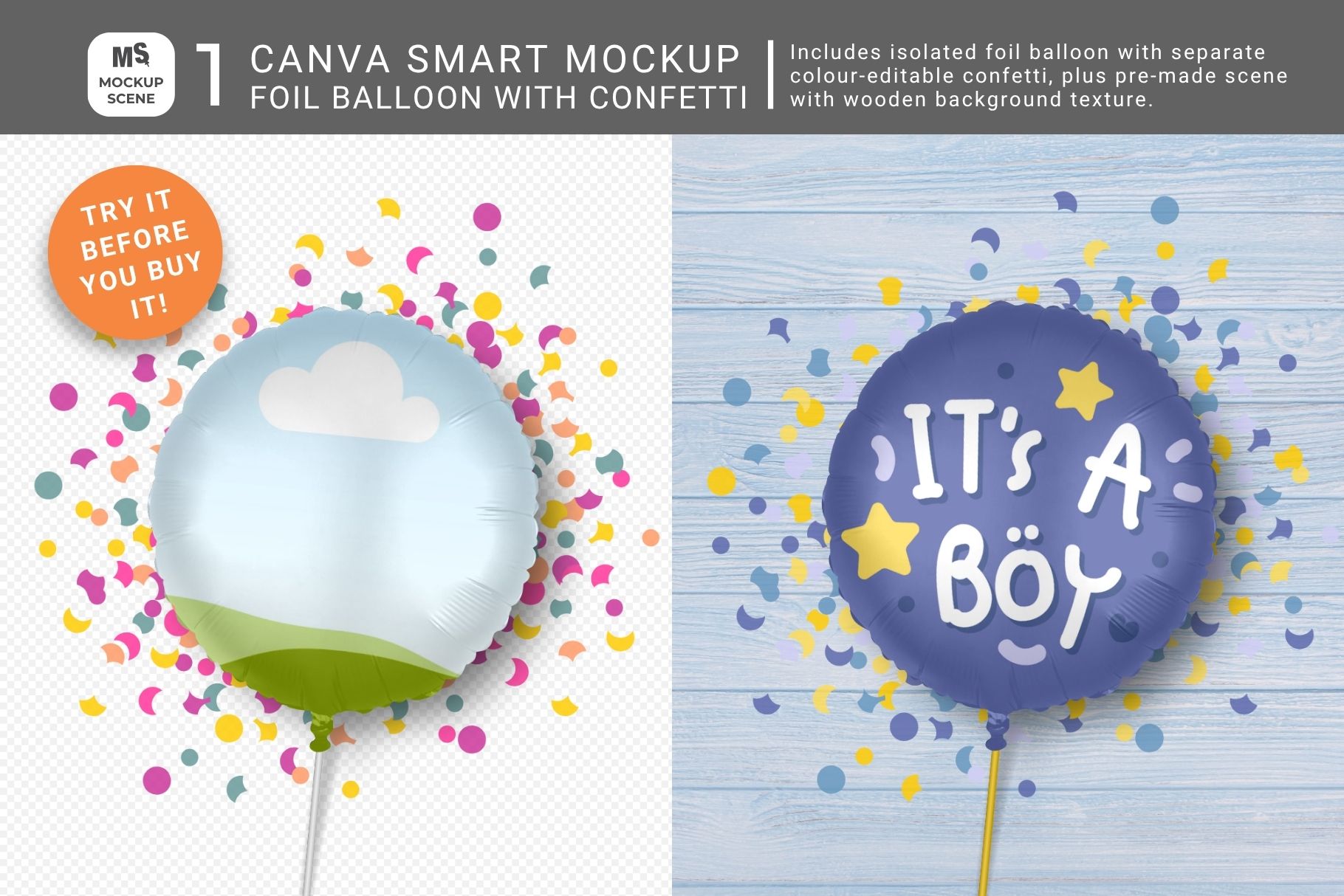
Use this Foil Balloon Canva Smart Mockup Single to display your event designs. Create realistic mockups to display your event and party designs and printables with this single Foil Balloon Canva Smart Mock up. It features 1 balloon mockup object from my full Party Printables Canva Mockup Set, with moveable colour-editable confetti, colour-editable stick and separate editable drop shadow – in top view. Also included is one ready-to-use pre-made mock-up scenes with a wooden background. The foil balloon mockup object is built from original digital drawings and fits a 1:1 (square or circular) design. The premade scenes features a removable background that you can swap out for your own. Unlike PNG overlay mock-ups, this customizable smart mockup allows you to duplicate and layer objects to showcase multiple designs effectively. All objects are moveable and drop shadows are editable. The foil shine and creases will show through your design. Edit the wooden background image colour using Canva’s Edit tool. Add a unique background color or scene, and cut out props to make your mockups truly unique and stand out. Will work well for the following design types: birthdays, birth announcements, Mother’s day, Father’s Day, anniversary, baptism, weddings, baby shower, kitchen tea, Halloween, Christmas, Easter, corporate events, etc. Why Choose My Foil Balloon Canva Smart Mockup? It’s a great way to try out one of my products before committing to purchase the full set. Additional features include: Versatile Customization: Easily personalize the mockup by photographing your workspace or using a studio background texture. Insert your JPG or PNG patterns or designs directly into the container frames to create a unique and professional product display. High-Quality Build: This mockup is custom-built for quality and style consistency. With effortless drag-and-drop functionality, you can achieve a realistic and polished end-product without needing Photoshop. Comprehensive Guidance: Detailed page notes included in the mockup guide you through the entire customization process, ensuring even Canva beginners can create stunning designs. Ideal For: Event Designers: Showcase your wedding, anniversary, birthday or other event designs quickly and professionally. Graphic Designers: Display branded celebratory and event designs in your portfolio and printed catalogs. Artists and Pattern Designers: Showcase your art and pattern sets without having to photograph and edit them. Usage Terms: This mockup bundle is for displaying your personal or commercial designs. Reselling the mockups in any format is prohibited. Copying any part of these mockups into new Canva templates for sale or for free distribution is not allowed. Please review my License Document before purchasing and using this product. How to Use this Foil Balloon Canva Smart Mockup: Download & Access: Start by downloading the User PDF and navigate to page 4 for license details and the Canva template link. Do not try to import the PDF into Canva as it doesn’t contain the mockups. Upload Your Designs: Ensure your designs or patterns are uploaded to Canva in JPG or PNG format at the correct size ratio (with no transparent backgrounds). Customize: – Import or copy the mockup into a new Canva design and drag your design into the custom-created container frames. – Adjust size, transparency, and shadows as needed to achieve the desired look. Add Backgrounds: Customize the mockup further by also adding your own background color, texture, scene, or digital props. Read Notes: Read the notes section for each mockup in the template for help on usage and additional tips. Included Mockups: Mockup 1 – Foil balloon with moveable, editable confetti: top view. Mockup 2 – Identical to Mockup 1 but with a wooden background texture added. Mockup Summary: Format: PDF with Canva access link. Template Dimensions: 3000 x 2000 px Resolution: 300dpi, perfect for print. Object Details: Transparent PNGs with separate, editable shadows. Customization: Drag and drop designs or change surface colors. Moveable Objects: Duplicate and rearrange as needed. Professional Display: Ideal for showcasing pattern designs. Requirements: Canva free or Pro. Stay updated on new products and creative mockup usage by following Mockup Scene on Instagram. Join my private Facebook Group to connect and share your mockup designs and challenges.